×

June 10, 2020
If we feel a responsibility towards the planet, let's try to be responsible towards ourselves too and make sure that our device does not end up costing us more than we have saved
According to a report published by World Economic Forum, il mondo ha prodotto circa 50 milioni di tonnellate di rifiuti elettronici nel 2018. Questa cifra potrebbe raddoppiare nei prossimi anni se non cambiamo le nostre abitudini di consumo. Nel tentativo di ridurre lo stress a carico del nostro pianeta, molte persone hanno iniziato a "diventare più green". Hanno ridotto il consumo di carne, hanno iniziato a comprare meno prodotti "fast fashion" e hanno persino aumentato i loro sforzi nel riciclo... in favore dell’ecologia.
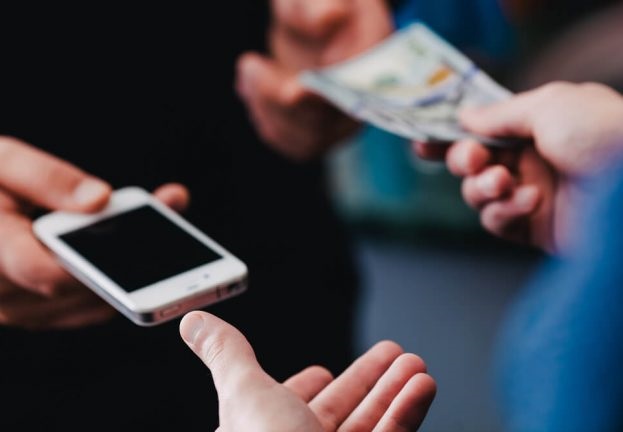
Another way to reduce waste and save hard-earned money is to buy second-hand electronics, especially computers and smartphones – an option worth considering.
However, purchasing a second-hand device carries a certain risk, since you do not know its history or usage over the months or years of service. But the risks can be contained, let's see how.
Purchase the device
When you choose to purchase a used device, you have a variety of options to choose from. The first, and probably best, choice is to purchase a refurbished device from an authorized seller. This basically means that the device has been cleaned and checked by the seller, both on the hardware and software side. In some cases, this option also includes a warranty on the device, which saves a number of problems in case of malfunctions shortly after purchase.
Alternatively, the other choice is to resort to purchasing from websites and online commerce. In this case, it will probably not be possible to personally inspect the device before ordering it. If you opt for this choice, you will have to rely on a reliable online sales site that has security measures to avoid possible scams. It will be helpful to do some research on the seller, take a look at the reviews and ask questions about the device. Once you have made your decision, it is advisable to use a payment service with online purchase protection.
What to do if you buy a second-hand computer?
If you do not opt for a refurbished computer or laptop, there are different actions to take. You need to check that everything is in order. In practice it was decided to buy sight unseen and some caution should be taken before implementing the device. Even if the PC already has a functioning operating system when you turn it on, before downloading your favorite programs or checking social media you should check that there are no residual data of the previous owner on the hard disk. Then you need to download and install reliable antivirus software to scan your computer.
"Perché?" ci si potrebbe chiedere. Beh, non c’è altro modo ragionevole per sapere se il venditore ha installato codici dannosi sul computer nel tentativo di frode. Il computer potrebbe avere un keylogger installato per accedere alle credenziali bancarie o forse qualche altra forma di malware in grado di rubare i dati e trasferirli a un server remoto. Così come è possibile che qualunque di queste ipotesi sia reale perché il precedente proprietario non ha preso le giuste precauzioni.
A green option - compared to replacing your computer's hard drive with a new one - would involve wiping the disk. Hard drive manufacturers offer utilities that allow you to erase the disk with varying degrees of security ranging from a single overwrite to multiple passes with random data and even specific security protocols. Once you have chosen and done one or the other, you should proceed with a clean install of your chosen operating system. The final touch for greater protection could be to add an endpoint security solution to your computer. After that the device will be ready for use.
What to do if you buy a second-hand smartphone?
As in the case of computers, the same logic applies to smartphones: if you have not chosen to purchase a refurbished product with a warranty, some precautions are necessary. Once your smartphone has been checked and shows no signs of hardware damage, it's time to check how the software works. If it starts instantly when you turn it on and doesn't require setup, you should be suspicious. The previous owner may not have carried out the deletion process correctly or, alternatively, your device may contain some form of malware.
To clean your phone safely it is good practice to check that all services have been deactivated; once this is done, all accounts associated with the device must be removed. The next step is to encrypt your phone data. It is certainly the safest choice, given that it is not possible to trace the type of information previously stored in the phone. And finally, finally, you can proceed with the factory reset. The name of the option may vary from manufacturer to manufacturer, but ultimately the function is the same: reset your smartphone to factory settings. This means that everything is erased and the phone should return to the state it was in originally, when it was unwrapped from the box.

Office printing, digital PR, marketing, lead generation: all projects are born from our passion and expertise, with an inevitable touch of creativity and innovation.
COMPANY
I SERVIZI
CONTACTS
© 2019 GRANDANGOLO COMMUNICATIONS SRL | P.IVA IT 06394850967 | All rights reserveD.
Powered by Webpowerplus

